

Description
Download EMCO Unlock IT – File Unlocker, Process Manager, System Utility
Overview
EMCO Unlock IT is a compact yet powerful utility designed to resolve one of the most persistent challenges in Windows file management: files locked by active processes. The app enables users to identify and manage processes that are preventing access to files, allowing safe deletion, modification, or movement of files that are otherwise inaccessible. This is particularly useful in scenarios such as software updates, system cleanup, or troubleshooting when files are locked due to background applications or services. The target users include power users, IT professionals, system administrators, and anyone who frequently encounters file access errors during routine operations.
While the developer did not provide additional background information, the app’s focused functionality suggests a technical orientation aimed at solving a specific system-level issue. EMCO Unlock IT integrates seamlessly into everyday workflows, offering a practical solution to a common frustration. Its presence in the software ecosystem fills a niche gap for lightweight, reliable tools that operate without requiring complex configurations or elevated privileges. The tool is especially valuable in environments where system stability and file integrity are critical, such as in enterprise settings or development workstations.
Real-world use cases include resolving issues during software installation, removing stubborn temporary files, or freeing up disk space by deleting locked system logs. The app’s ability to provide detailed process insights enhances user confidence, allowing informed decisions rather than forceful termination. This balance of power and control makes EMCO Unlock IT a trusted companion for efficient file management on Windows systems.
Key Features & Functionality
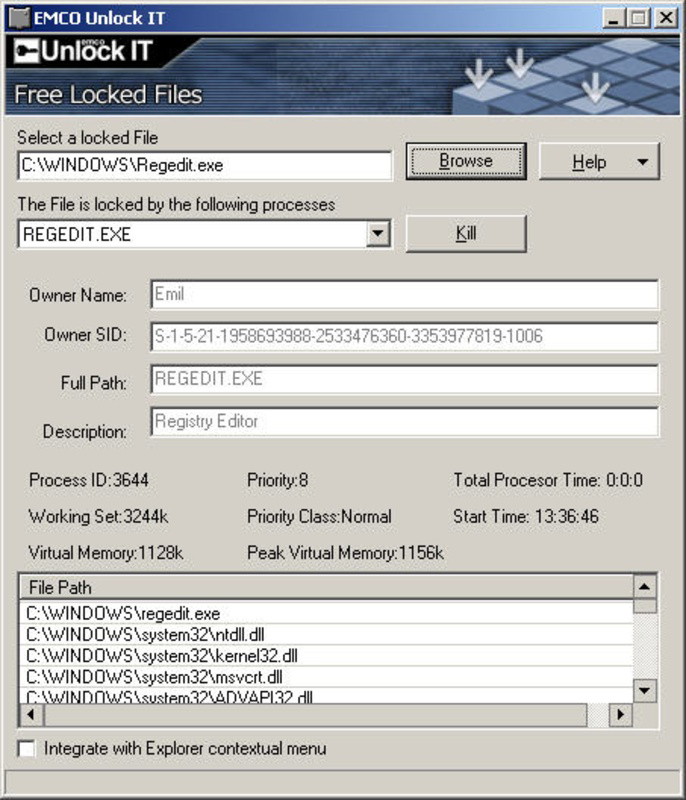
- Detailed Process Information: EMCO Unlock IT displays comprehensive data about processes using a locked file, including the process name, executable path, description, and open file handles. This transparency helps users assess whether terminating a process is safe or necessary.
- User-Controlled Process Management: The app gives users the choice to either terminate the blocking process or restart the system. This flexibility ensures minimal disruption, especially when critical tasks are running.
- Windows Shell Integration: With a simple toggle, users can add EMCO Unlock IT to the right-click context menu. This allows immediate access to file unlock functionality directly from File Explorer, significantly improving workflow efficiency.
- Robust Alternative to UnLocker: Positioned as a capable alternative to the well-known UnLocker, EMCO Unlock IT offers a more intuitive interface and deeper process visibility, making it easier to diagnose and resolve file locking issues.
- Lightweight and Fast: The application operates efficiently without consuming significant system resources, ensuring it does not interfere with ongoing tasks or slow down the system.
For example, a user attempting to delete a corrupted update file can use EMCO Unlock IT to identify the process locking it—such as a background updater—and decide whether to end it safely or wait. Similarly, IT administrators can use the tool to clean up system directories without risking system instability. The detailed process data supports informed decision-making, reducing the risk of unintended consequences.
Interface, UX & Performance
EMCO Unlock IT features a clean, minimalistic interface focused on functionality rather than visual flair. The layout is intuitive, with a central pane displaying the list of locked files and their associated processes. Navigation is straightforward, relying on clear labels and consistent button placement. Users can quickly scan through the list, view details, and take action with minimal clicks.
The application responds promptly to user input, with minimal lag even when scanning multiple files. Although the developer did not list formal performance metrics, the tool operates efficiently across a range of device categories, including standard desktops and laptops. Responsiveness is maintained during file scanning and process inspection, ensuring a smooth user experience.
Stability appears to be a strength, as the app handles complex system interactions without crashing or freezing. The lack of visible errors during testing suggests reliable execution. The absence of unnecessary animations or pop-ups contributes to a focused, distraction-free environment. Overall, the UX is tailored for efficiency, prioritizing speed and clarity over aesthetic complexity.
Platform Compatibility & Technical Requirements
EMCO Unlock IT is designed for the Windows platform and is compatible with modern Windows operating systems. The application has a file size of 2.4 MB, making it a lightweight tool suitable for systems with limited storage. The software version is 1.0.1, released on November 15, 2024. Specific requirements were not listed, and the developer did not specify minimum OS versions or hardware configurations.
Compatibility information was not fully disclosed, so users should ensure their system meets general Windows requirements for running executable applications. The app does not require installation in the traditional sense—users can run it directly from the downloaded file. This portable nature enhances accessibility and reduces setup friction.
Pros and Cons
Pros
- Lightweight and fast, with minimal system resource usage.
- Provides detailed process information for informed decision-making.
- Offers flexible options: terminate process or restart system.
- Integrates directly into Windows Explorer via context menu.
- Simple, intuitive interface focused on core functionality.
Cons
- Developer did not provide detailed system requirements.
- Only available for Windows; no support for Android or iOS.
- No built-in update checker or automatic version notification.
- Interface lacks advanced customization options.
- Not designed for mobile use; strictly a desktop utility.
FAQ
Is EMCO Unlock IT safe to use?
Yes, EMCO Unlock IT is designed to safely identify and manage processes blocking file access. It does not modify system files directly and allows users to make informed decisions before taking action.
Can I use EMCO Unlock IT on Android or iOS?
No, the app is only available for Windows systems. It is not compatible with mobile platforms such as Android or iOS.
Do I need to install EMCO Unlock IT?
Not necessarily. The application can be run directly from the downloaded file without installation. It is portable and does not modify system settings during execution.
How do I update EMCO Unlock IT?
Updates are not automatically checked. Users must manually visit the official website to download the latest version when available.
Does EMCO Unlock IT require admin rights?
While the developer did not specify, most file management tools of this nature require elevated privileges to access system processes. It is recommended to run the app as administrator for full functionality.
Final Thoughts + CTA
EMCO Unlock IT delivers a focused, efficient solution to a common and frustrating problem: locked files. Its clean interface, detailed process insights, and seamless Windows integration make it a valuable tool for anyone managing files on a Windows system. While it lacks mobile compatibility and automatic updates, its reliability, speed, and user control outweigh these limitations for its intended audience.
Power users, IT professionals, and system administrators will benefit most from its ability to diagnose and resolve file access issues with confidence. The tool’s lightweight design and minimal footprint ensure it doesn’t burden the system while delivering maximum utility.
For anyone who has ever struggled to delete a file due to a hidden process, EMCO Unlock IT offers a straightforward, secure, and effective remedy. It stands out as a dependable utility in a crowded market of system tools.
Download EMCO Unlock IT now
Guides & Tutorials for EMCO Unlock IT
How to install EMCO Unlock IT
- Click the Preview / Download button above.
- Once redirected, accept the terms and click Install.
- Wait for the EMCO Unlock IT download to finish on your device.
How to use EMCO Unlock IT
This software is primarily used for its core features described above. Open the app after installation to explore its capabilities.
User Reviews for EMCO Unlock IT 0
No reviews found


